🎯 Introduction
“I’ll just throw it in DynamoDB.”
I’ve heard this line dozens of times from engineers building AI agents. It sounds reasonable. You need to store conversation history, maybe some user preferences. DynamoDB is fast, scalable, and you already use it. How hard could it be?
Here’s the thing: agent memory isn’t just storage. It’s what separates an agent that forgets everything you said five minutes ago from one that actually remembers your last conversation, pulls up context from three weeks ago, and knows which details matter and what data is fresh.
The mistake is thinking agent memory is just another CRUD problem. Store messages, retrieve them when needed, done. But agents don’t work like traditional apps. They need to figure out which memories are relevant, when something happened, how important different pieces of information are, and how to turn thousands of interactions into useful context.
In this post, I’ll show you why building your own agent memory system takes more work than you’d expect, what agent core memory systems actually do, and when you should (or shouldn’t) build your own solution. You’ll see why treating agent memory as “just another storage problem” means signing up for weeks/months of unexpected engineering work.
⚠️ Why Not LangChain’s Memory Interfaces?
Before we talk about building from scratch, let’s address the other common approach: using LangChain’s built-in memory.
LangChain offers several memory implementations like ConversationBufferMemory and ConversationSummaryMemory. These work fine for prototypes and demos. The problem? They’re basically wrappers around simple key-value storage.
Here’s what you don’t get with LangChain’s memory interfaces:
No semantic search. You can’t find relevant memories based on meaning. If a user asks “What did we discuss about my project deadline?” the system can’t search for semantically related conversations. It just returns the last N messages or a basic summary.
No temporal reasoning. The system doesn’t understand that something from yesterday is more relevant than something from three months ago, unless you manually code that logic.
No automatic consolidation. As conversations grow, you either keep everything (expensive and slow) or manually decide what to summarize. There’s no intelligent compression of old memories.
No cross-session context. Each conversation is isolated. If a user had three separate chats about the same topic, the agent can’t connect those dots without you building custom retrieval logic.
LangChain’s memory was designed to get agents working quickly in development. For production systems handling thousands of users and long-running conversations, you need something more sophisticated. That’s where agent core memory comes in.
🔍 What is AWS Agent Core Memory?
Agent core memory is a specialized storage and retrieval system designed specifically for how AI agents think and work.
Think of it like this: traditional databases are organized for computers. You query by exact matches, IDs, or specific fields. Agent core memory is organized for conversations. It stores information the way humans naturally recall things - by meaning, relevance, and time.
Here’s what makes it different:
Semantic organization. Memories are stored with vector embeddings, so the system can find relevant information based on meaning, not just keywords. When a user asks “What’s my budget?” the agent can retrieve the conversation where they discussed financial constraints, even if the word “budget” never appeared.
Contextual retrieval. The system understands which memories matter for the current conversation. It doesn’t just dump all past messages. It intelligently selects what’s relevant based on the current context, time, and conversation flow.
Automatic consolidation. As conversations accumulate, agent core memory compresses old interactions without losing important details. Instead of keeping 1,000 individual messages, it might consolidate them into “User prefers Python over JavaScript for data work” and “User is building a recommendation system for e-commerce.”
Time-aware context. The system tracks when things happened and weighs recent information more heavily. If a user changed their mind about something, the agent knows to prioritize the latest preference.
This isn’t just a database with fancy features. It’s a memory architecture that mirrors how agents need to think - understanding context, relevance, and time all at once.
🛠️ The DIY Path: What Building Your Own Actually Involves
Let’s say you decide to build your own agent memory system. Here’s what you’re actually signing up for:
Step 1: Design your schema. You need tables for messages, user context, and metadata. But how do you structure conversation threads? How do you link related discussions across sessions? What fields do you need for retrieval?
Step 2: Add vector storage. DynamoDB doesn’t do semantic search natively. So now you’re integrating Pinecone, or setting up pgvector with PostgreSQL, or using Redis with RediSearch. That’s another service to manage, sync, and pay for.
Step 3: Build retrieval logic. You need code that takes a user query, generates embeddings, searches your vector store, ranks results by relevance, filters by time, and returns the right context. This isn’t a single query - it’s a pipeline.
Step 4: Implement consolidation. Old conversations can’t just pile up forever. You need logic to periodically summarize and compress older memories. When do you trigger this? How do you preserve important details while reducing noise?
Step 5: Handle edge cases. What happens when a user deletes their data? How do you handle concurrent updates? What about rate limits on your embedding API? How do you recover if consolidation fails halfway through?
This takes 8-12 weeks of focused engineering time for a basic v1. If you’re learning as you go, add another week or two. Then comes the ongoing maintenance - debugging retrieval issues, optimizing costs, monitoring performance, and adding features as your agent gets more sophisticated.
You’re not just building storage. You’re building a complete memory management system with vector search, intelligent retrieval, and data lifecycle policies + security.
💥 Where DIY Solutions Break Down
Even if you build a working memory system, here’s where the party starts.
Context retrieval at scale
Finding relevant memories isn’t just running a vector similarity search. You need to balance semantic relevance with recency, importance, and conversation flow.
Say a user asks “What did we discuss about the API?” Your system needs to:
- Find conversations mentioning APIs
- Weight recent discussions higher than old ones
- Prioritize messages where APIs were the main topic, not just mentioned in passing
- Return enough context to be useful, but not so much that you blow your token budget
Building this ranking logic takes trial and error. You’ll spend time tuning similarity thresholds, time decay functions, and context window sizes. Every agent has different needs.
Memory consolidation
You can’t keep every message forever. Storage costs add up, and dumping 10,000 messages into your agent’s context doesn’t work.
So you need consolidation. But how do you decide what to keep? A simple approach might summarize conversations older than 30 days. But what if an important detail gets lost in that summary? What if the user references something from two months ago?
You need logic that:
- Identifies key information worth preserving
- Summarizes less important details
- Maintains connections between related memories
- Runs periodically without breaking ongoing conversations
This isn’t a weekend project. It’s an ongoing challenge of information compression.
Temporal reasoning
Time matters differently in conversations. Something from yesterday is usually more relevant than something from last year. But not always. If a user set a project deadline six months ago, that's still critical context.
Your system needs to understand:
- Recency bias for general context
- Long-term facts that stay relevant (user preferences, project details)
- When to override recency (explicit references to older conversations)
Building this temporal logic means tracking metadata, implementing decay functions, and handling special cases where old information stays important.
Priority and relevance
Not all memories are equal. A user saying “I prefer dark mode” is more important than “I had coffee this morning.”
Your system needs to distinguish between:
- Core facts about the user
- Temporary context from a single conversation
- Procedural details about how to do something
- Casual conversation filler
Without explicit priority handling, your agent might retrieve irrelevant details while missing critical context. Building a relevance scorer means defining what “important” means for your use case and training or tuning models accordingly.
Cost implications
Vector similarity searches aren’t free. With DynamoDB plus Pinecone, you’re paying for:
- Storage in both systems
- API calls to your embedding model (OpenAI, Cohere, AWS Titan etc.)
- Vector search operations
- Data transfer between services
A dummy implementation might generate embeddings for every query and search your entire vector store. At scale, this gets expensive fast. You need caching, batch operations, and smart filtering to keep costs reasonable.
Compare that to full table scans in DynamoDB - also expensive, but at least you’re only paying one service. Either way, you’re optimizing costs while maintaining quality.
🚀 How Agent Core Memory Solves These Problems?
Agent core memory systems are built specifically to handle everything we just talked about.
Here’s how they work:
Agent memory systems handle the complexity of semantic search so you don’t have to build it yourself.
What you’d build manually:
| |
With an agent memory system:
The system handles embedding generation, vector storage, and semantic matching. You query with natural language, and it returns relevant memories without managing multiple services or tuning similarity thresholds.
Automatic memory consolidation
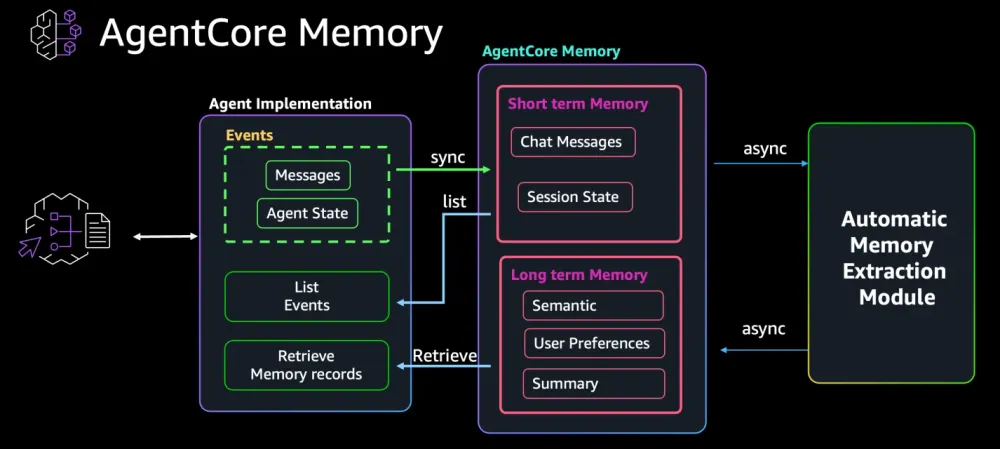
AWS Bedrock Agent Core uses memory strategies to automatically extract long-term insights from conversations.
How it works in practice:
When you create a memory resource, you configure strategies that define what to extract:
| |
What happens behind the scenes:
As conversations occur, the system captures raw events:
| |
The system then asynchronously processes these conversations based on your configured strategies:
- SummaryStrategy: Extracts key points from the session (“User reported delayed order #ABC-456”)
- UserPreferenceStrategy: Identifies preferences (“User prefers FedEx shipping”)
These extracted insights become long-term memories stored in organized namespaces:
/users/sarah-123/preferences→ “Prefers FedEx shipping”/summaries/sarah-123/session-1→ “Reported order delay, wants FedEx for future orders”
Later retrieval:
| |
Why this matters:
Without this system, you’d need to:
- Write extraction logic to identify preferences vs session summaries
- Build asynchronous processing to analyze conversations
- Create namespace organization for different memory types
- Implement semantic search across extracted facts
- Handle the lifecycle of raw events vs extracted insights
Agent Core handles all of this. You define strategies, capture conversations, and the system automatically extracts, organizes, and makes searchable the relevant long-term context.
Time-aware context retrieval
The system knows that recent information usually matters more, but also preserves long-term facts that stay relevant.
Agent memory systems organize memories with timestamps and metadata, allowing retrieval to balance recency with importance. When you search for memories, the system automatically considers:
- How recently the memory was created or referenced
- Whether it’s a long-term fact (like a user preference) or temporary context
- The semantic relevance to the current query
You don’t need to write time decay functions or manually track when facts were established. The system handles temporal weighting as part of its retrieval logic.
Optimized for agent access patterns
The system is designed around how agents actually use memory. It knows:
- Agents need fast retrieval during conversations (not batch processing)
- Context windows are limited
- Relevance depends on the current conversation topic
- Some facts are more important than others
When you retrieve memories, you can specify constraints like top_k to control how many results you get back, ensuring you stay within your LLM’s context window while getting the most relevant information.
📊 The Real Cost Comparison
Let’s break down what you’re actually spending when you build your own versus using agent core memory.
Development time
DIY approach: 2-4 weeks for basic implementation
- Week 1: Schema design, set up DynamoDB + vector store
- Week 2: Build retrieval logic, implement basic ranking
- Week 3-4: Add consolidation, handle edge cases, test at scale
That’s assuming you know what you’re building. Add another 1-2 weeks if you’re figuring out requirements as you go.
Agent core memory: A few hours
- Set up the memory resource
- Configure strategies (consolidation frequency, retention)
- Integrate with your agent
You're writing configuration, not building infrastructure.
Operational overhead
DIY approach:
- Monitor two services (DynamoDB + vector store)
- Debug retrieval quality issues
- Tune similarity thresholds and ranking weights
- Optimize consolidation jobs
- Handle failed embeddings and API rate limits
- Update schema as requirements change
Every production issue requires understanding your custom retrieval logic. New team members need to learn how your memory system works.
Agent core memory:
- Monitor one service
- Adjust policies through configuration
- Issues get fixed upstream, not in your codebase
When retrieval quality improves, you get the upgrade automatically.
Cost at scale
Let’s look at a realistic example: 10,000 users, each with 500 memories on average.
DIY with DynamoDB + Pinecone:
- DynamoDB: $25/month for storage, $50-100/month for read/write operations
- Pinecone: $70/month (starter tier) or $200+/month for production
- OpenAI embeddings: $20-50/month depending on consolidation frequency
- Total: $165-375/month (and you’re managing complexity)
Agent core memory (AWS Bedrock Agent Core example):
- Short-term memory: $0.25 per 1,000 events
- Long-term memory storage: $0.75 per 1,000 memory records stored per month ($0.25 with custom strategies)
- Long-term memory retrieval: $0.50 per 1,000 retrieval calls
For a realistic example with 10,000 users and moderate usage (100,000 short-term events, 10,000 long-term memories, 20,000 retrievals per month):
- Short-term memory: $25/month
- Long-term storage: $7.50/month
- Retrieval calls: $10/month
- Total: ~$43/month for memory alone
This doesn’t include model inference costs (which you’d pay regardless of your memory solution). Compare this to the DIY approach ($165-375/month for storage and vector search) plus 3 weeks of upfront engineering and ongoing maintenance.
🎯 When You SHOULD Build Your Own
Agent core memory isn’t always the right choice. Here are scenarios where building your own makes sense:
Specific compliance requirements
If you’re in healthcare, finance, or government, you might have data residency requirements that agent core memory providers can’t meet.
Maybe you need:
- Data stored only in specific geographic regions
- Complete control over encryption keys
- Air-gapped systems with no external API calls
- Custom audit logging that meets regulatory standards
In these cases, building your own gives you full control over where data lives and how it’s protected.
Highly specialized memory patterns
Agent core memory is designed for general conversational patterns. If your agent has unique requirements, custom might be better.
Examples:
- A medical diagnosis agent that needs to store memories following clinical documentation standards
- A legal research agent where citation chains and precedent relationships are critical
- An industrial control agent where time-series data and equipment state matter more than conversations
If your memory structure looks nothing like normal agent conversations, the abstractions in agent core memory might not fit.
Legacy system integration
Maybe you already have a complex data infrastructure that stores user context, and you need your agent to integrate with it.
You might have:
- An existing CRM with user preferences and history
- Internal knowledge bases with proprietary search systems
- Custom databases with business-specific schemas
Building a thin memory layer on top of existing systems can be simpler than migrating everything to a new memory provider.
You have very specific cost constraints
If you’re operating at massive scale (millions of users) or with very tight margins, the economics might favor building your own.
Maybe:
- You can optimize storage costs by using specific database features
- Your usage patterns mean you’d pay less with a custom solution
- You have spare engineering capacity and tight budgets
Being honest about the trade-offs
Here’s what you’re accepting when you build your own:
You own the complexity. Every bug, every performance issue, every feature request lands on your team.
You’re slower to improve. While agent core memory providers add new features (better consolidation, improved retrieval), you’re maintaining what you built.
You need expertise on your team. Someone needs to understand vector databases, embedding models, and information retrieval. If that person leaves, knowledge walks out the door.
If you’re okay with these trade-offs and have a clear reason to build custom, go for it. Just make sure you’re choosing custom for the right reasons, not because “we can build it ourselves” sounds appealing.
Most teams building AI agents should focus on what makes their agent unique, not on rebuilding memory infrastructure that already exists.
💡 Conclusion
Building your own agent memory system sounds straightforward until you actually do it. What starts as “just storing messages in DynamoDB” turns into weeks of work building semantic search, consolidation logic, and relevance ranking.
Here’s what we covered:
Agent memory isn’t traditional storage. It needs to understand meaning, time, and relevance in ways databases weren’t designed for.
LangChain's memory interfaces work for demos, but they're too simple for production agents that need semantic search, consolidation, and cross-session context.
Building your own means 2-4 weeks upfront, plus ongoing maintenance for retrieval quality, cost optimization, and feature additions. You’re building infrastructure instead of your agent’s unique capabilities.
Agent core memory gives you semantic search, automatic consolidation, time-aware retrieval, and optimized performance out of the box. You write configuration, not code.
Custom solutions make sense for specific compliance needs, highly specialized memory patterns, or deep legacy integration. But most teams should use existing tools.