Your agent makes a tool call. The tool returns 40 rows of JSON. That JSON gets stuffed back into the model’s context, the model thinks for a bit, calls another tool, gets another 40 rows back, and on it goes.
By iteration 10, your prompt is mostly curly braces, quoted keys, and the same field names repeated hundreds of times.
You’re paying for every single one of those tokens. And you’re paying for them on every subsequent model call in the run, because tool results stick around in the conversation history.
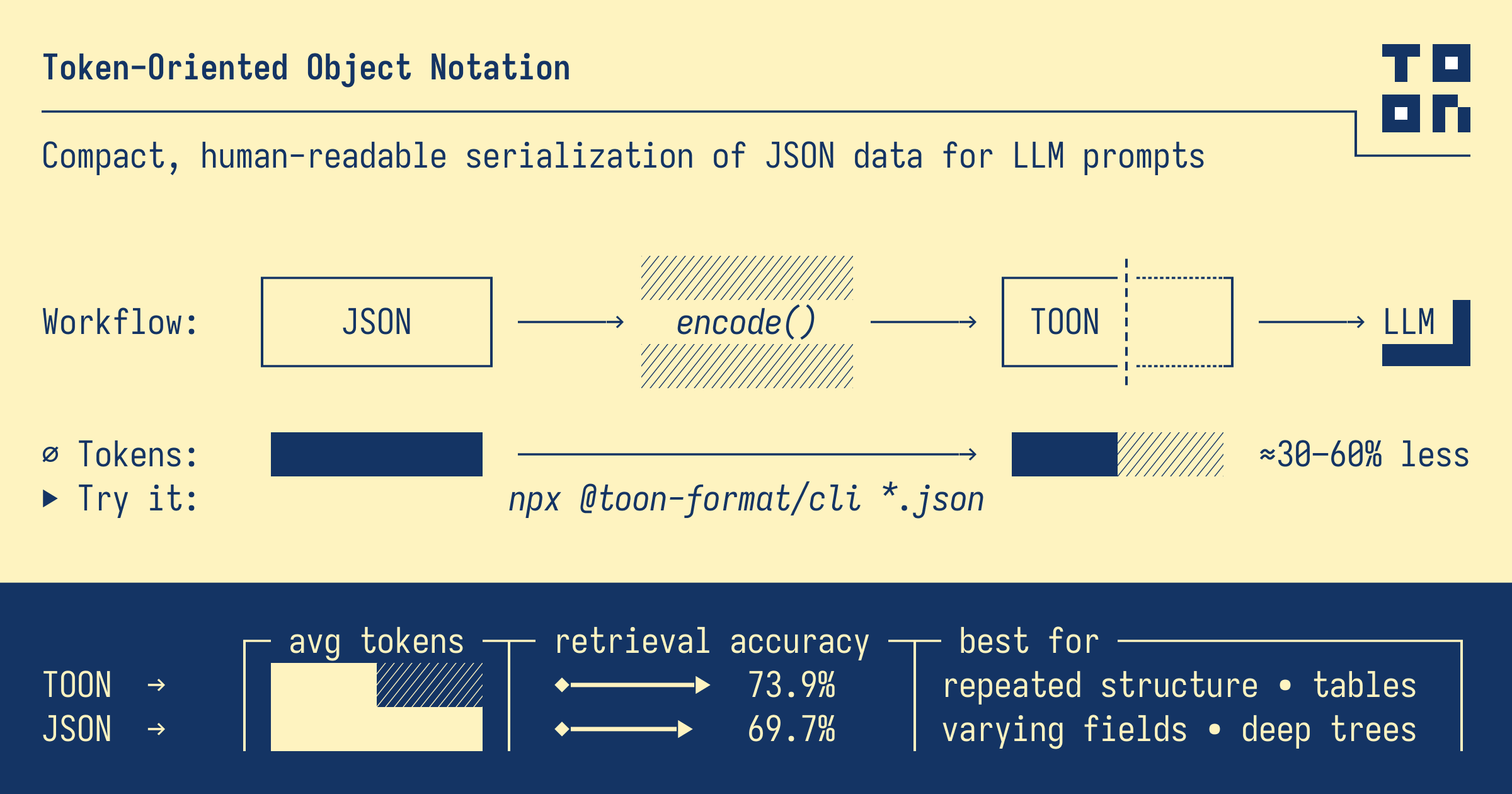
There’s a serialization format called TOON. Token-Oriented Object Notation that encodes the same JSON data with 30-50% fewer tokens. It’s lossless, human-readable, and the sweet spot is exactly the shape that tool calls return: arrays of objects with the same fields.
Drop it in front of your tool results, leave the rest of your agent alone, and you cut both your bill and the rate at which you fill up the context window.
In this post, I’ll show you what TOON looks like, why agents bleed tokens specifically on tool results, how to wire it into a LangGraph agent running on Databricks, and what the actual savings look like on a realistic workload. We’ll also cover where TOON doesn’t help.
🤔 What TOON Is, in 60 Seconds
TOON is a lossless encoding of the JSON data model. Same objects, same arrays, same primitives different syntax. It uses YAML-style indentation for nested objects and a CSV-style table layout for uniform arrays of objects. That second part is where the token savings come from.
Let’s look at a tool result your agent might actually see. Say search_tickets returns 5 support tickets:
JSON (what your tool returns by default):
| |
TOON (same data, encoded for the model):
For 5 rows it’s already a decent win. For 50 rows it’s a much bigger one, because the per-row overhead ({"id": ..., "priority": ..., "category": ...} repeated for every record) is what dominates the JSON token count, and TOON eliminates almost all of it.
The header tickets[5]{id,priority,category,status,age_days} is the schema. The rows are pure data. Models read it fine, because it’s close enough to CSV that they slot into pattern-matching mode quickly, and the explicit length and field list keep them from hallucinating extra rows or skipping fields.
- TOON is lossless. You can encode JSON to TOON, decode TOON back to JSON, and get the original bytes back. It’s a representation choice, not a lossy compression.
- It’s not always a win. For deeply nested config-style data with no repeated structure, JSON is often more compact. TOON’s superpower is uniform arrays of objects, which happens to be exactly what 90% of agent tool calls return.
That’s the whole concept. Now let’s look at why this matters disproportionately for agents.
🔁 Why Agents Specifically Bleed Tokens on Tool Results
A one-shot LLM call pays the token cost of its prompt once. Send 5KB of JSON in, get an answer back, done.
Agents don’t work that way. An agent is a loop: model thinks, model calls a tool, tool returns data, that data gets appended to the conversation history, model thinks again with the expanded history, calls another tool, and so on. The conversation grows on every iteration, and every byte that’s already in there gets re-sent to the model on every subsequent turn.
This is the part that surprises people the first time they look at their bills. Let’s walk through what actually happens.
Suppose your agent runs for 10 iterations. On each iteration, a tool returns roughly 4,000 tokens of JSON. The naive expectation is that you’ve added 40,000 tokens total to the run. The reality is worse:
- Iteration 1: model reads system prompt + user message → calls tool → tool returns 4K tokens. Model now sees ~5K tokens on its next call.
- Iteration 2: model reads everything from iteration 1 (5K) + new tool result (4K) = ~9K tokens.
- Iteration 3: ~13K tokens.
- Iteration 10: ~41K tokens on the final model call alone.
Add up the tokens read across all 10 model invocations and you’re at roughly 230,000 input tokens for a single agent run. The same tool result from iteration 2 gets re-read by the model nine more times before the run ends. You pay for it every time.
Now flip the lens. If TOON cuts each tool result from 4,000 tokens down to 2,400 tokens (a conservative 40% reduction for tabular results), the same run drops to about 138,000 input tokens. You just saved ~92,000 tokens on a single run, without changing the agent’s behavior, prompts, or tools, only the encoding of what the tools hand back.
A few things compound this effect in practice:
- Tool results dominate the conversation. System prompts and user messages are usually small. The bulk of context window usage in a multi-step agent is tool output sitting in history.
- Most tool results are tabular. Database query results, vector search hits, API responses with arrays of records, spreadsheet rows. The shape that TOON compresses best is the shape tools return most often.
- Context window pressure is real. Cutting tool result size doesn’t just save money; it lets the agent run longer before hitting the model’s context limit. On a 200K-token Claude Sonnet window, going from 4K to 2.4K per tool result means you fit roughly 40 more tool calls before things start getting truncated.
- The savings scale with run length. Short agents (2-3 iterations) save a little. Long-running agents (10+ iterations, deep research, multi-step workflows) save a lot, because the same tool result gets re-billed on every subsequent turn.
🛠️ Wiring TOON into a LangGraph Agent on Databricks
The good news: you don’t rewrite your agent. The encoding swap happens at exactly one point, the moment a tool returns data and that data gets appended to the conversation. Everything else stays the same.
The pattern is simple:
- Your tool function still queries the database and returns Python dicts/lists, like normal.
- Before the result hits the conversation history, you encode it as TOON.
- You wrap it with a tiny header so the model knows what it’s looking at.
Let’s build it. Assume we’re on Databricks with the Foundation Model APIs, querying a Delta table of support tickets.
Installing TOON
The reference implementation is in TypeScript, but there’s a community Python library. Install it on your Databricks cluster or notebook:
The encoding wrapper
We want every tool result in the agent to flow through a TOON encoder before it lands in the conversation. The cleanest way is a small wrapper that takes any tool’s output and returns a TOON-encoded string:
| |
Now we wrap our tool. LangGraph lets you post-process tool output before it goes back to the model. The trick is to have the tool return a TOON string instead of a list:
Creating two search tool one for JSON and one for TOON
This tool, as written, returns JSON to the model when LangGraph serializes it. That’s the leak we’re plugging.
| |
The tool’s return type is now a string, the TOON-encoded payload, which LangGraph will hand straight to the model in the next turn.
Telling the model what TOON is
This is the part that gets skipped and breaks the whole thing. The Foundation Models on Databricks (Claude Sonnet, Llama, etc.) have never seen TOON in training. If you don’t tell them what they’re looking at, they’ll either ignore the structure or invent things.
Add a short primer to your system prompt. One paragraph and one example is enough. The format is simple enough that models pick it up in-context immediately:
Create token tracking utility classes
| |
Putting it together in LangGraph
The rest of the agent is boilerplate. Build the graph, bind the tool, point at a Databricks Foundation Model endpoint:
| |
That’s the whole wiring job. The agent calls search_tickets, gets a TOON-encoded table back, the model reads it natively because of the primer, and you’ve cut the per-tool-call token cost by roughly 40% without touching your agent’s logic.
A few practical notes:
- Keep tool calls in JSON. The model produces tool call arguments. Those go through the model’s native function-calling format, which is JSON-shaped and trained-in. TOON only swaps in for results going back to the model. Don’t try to TOON-encode the tool schema or the model’s outgoing calls.
- The primer goes in the system prompt once. You don’t need to re-explain TOON on every turn.
- Apply the wrapper consistently. If you have ten tools, all ten need to return TOON strings. Mixing JSON and TOON results in the same conversation works, but it’s confusing for both you and the model.
- Unity Catalog functions work the same way. If you’ve registered tools as UC functions, the wrapper goes inside the function body before returning.
🧪 Setting Up the Benchmark on Databricks
If you want to reproduce the numbers in the next section, or measure TOON’s impact on your own agent, here’s the full setup. Plain Spark, no extra libraries beyond what we’ve already installed.
Generating the dummy ticket data
We need a Delta table with enough rows that a realistic search_tickets query returns 30-50 results per category. Plain spark.range() with some when/otherwise columns gets us there in about 20 lines:
| |
Quick sanity check:
You should see roughly 600-700 rows per category over the last 30 days, split across statuses. That’s plenty for the agent to find patterns in.
Capturing token usage from each model call
The Databricks Foundation Model API returns a usage object with every response: prompt_tokens, completion_tokens, and total_tokens. The cleanest way to grab those across an entire agent run is a LangGraph callback handler:
| |
We add some pricing tracking also
| |
Mine results
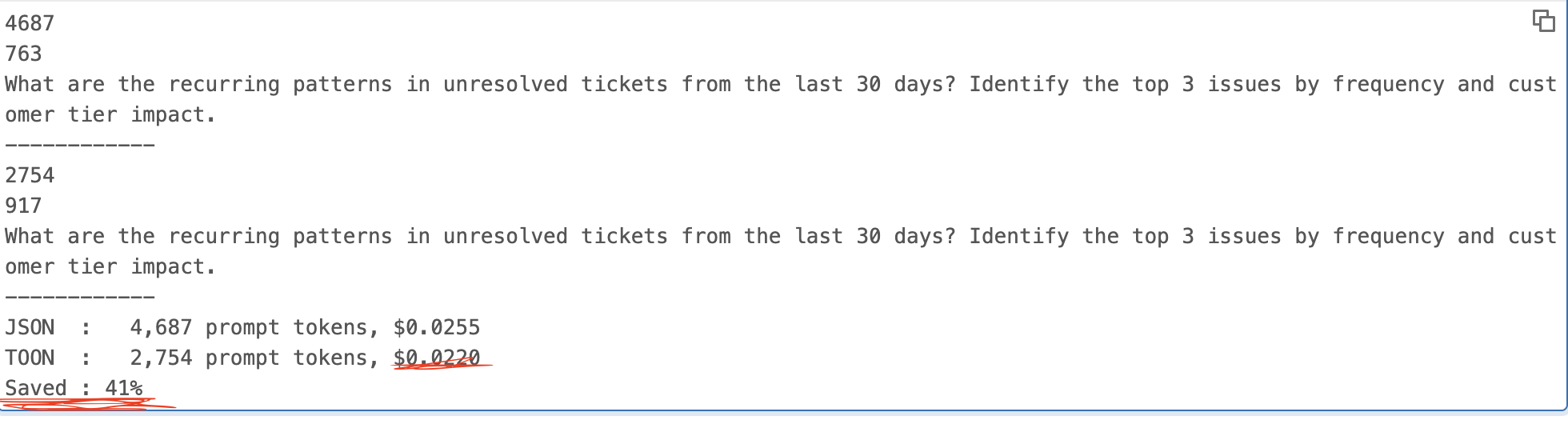
The prompt_tokens count is what TOON actually reduces. Watch that number specifically when comparing the two agents.
So as you can see we have 41% savings in token which is huge!
What this looks like at scale
A single run saving $0.23 isn’t life-changing. Multiply it out:
- 1,000 runs/day: ~$230/day saved, ~$84K/year
- 10,000 runs/day: ~$2,300/day saved, ~$840K/year
- Higher-volume agentic workloads (think: every customer support ticket triggering an investigation agent, or a research agent firing on every internal query): the math gets uncomfortable to ignore
For context window budget, separate from cost, the same 41% reduction means agents that previously hit the 200K Sonnet window after ~12 tool calls can now run for ~20 before truncation kicks in. That’s a meaningful difference for deep-research and multi-step workflows.
What didn’t work as well
Two scenarios where TOON didn’t earn its keep, both worth flagging:
- A
get_ticket_detailtool that returned a single deeply-nested ticket object (with nested customer info, comment threads, attachment metadata). TOON saved about 8% here, close to the noise floor. For non-tabular data, JSON was nearly as compact. - A run where the agent only made 2 tool calls. Total savings were ~$0.04. The fixed cost of the system prompt + TOON primer eats into the savings on short runs. TOON is most valuable on agents that loop a lot.
Bottom line: the benefit shows up cleanly when (a) tool results are tabular and (b) the agent runs long enough for those results to compound. Both conditions describe most production agents I’ve seen, but neither is automatic. Measure on your own workload before celebrating.
⚠️ Honest Gotchas
None of them are dealbreakers, but knowing them up front saves pain.
The model needs a primer or it will guess
This is the one that bit me first. I dropped TOON-encoded tool results into the conversation without updating the system prompt and ran the agent. It mostly worked, until the model decided that the [5] in tickets[5]{...}: was a value, started asking me what “tickets 5” meant, and once tried to filter rows by an id column that didn’t exist.
A one-paragraph primer in the system prompt fixes this completely. The format is simple enough that models pick it up in-context, but they need to be told they’re looking at TOON. Don’t skip it. The primer in section 4 is the bare minimum; for production I’d recommend adding 2-3 examples covering edge cases (empty arrays, single-row results, mixed types).
Don’t TOON-encode the tool schema or the model’s tool calls
TOON is for data flowing into the model. Tool definitions, function call arguments the model produces, and structured outputs the model needs to generate. Leave all of those as JSON. Models are heavily trained on JSON-shaped function calling and breaking that pattern just to save a few tokens on the schema is a bad trade.
I tried encoding tool results in TOON and converting tool definitions to a TOON-ish format on a whim. The agent immediately started malforming tool calls. Reverted, problem gone.
Non-uniform arrays are a mixed bag
TOON’s compactness comes from uniform arrays where every row has the same fields. The moment you have an array of objects where some have customer_email and others don’t, TOON has to fall back to a less compact representation, and the savings shrink fast. For deeply nested or heterogeneous tool results, benchmark it. Sometimes JSON wins by a few percent; sometimes TOON still wins by 15%. There’s no shortcut here other than measuring.
If your tool returns a mix, say a list of tickets where each ticket has a nested array of comments, encode the outer list as TOON and let the nested structures fall out as TOON does by default. Don’t try to flatten the schema yourself just to maximize compression. Readability for the model matters more than the last 5% of token savings.
Latency on smaller models can be worse despite fewer tokens
This one’s counterintuitive. Token count isn’t the only thing that determines response time. Smaller and locally-hosted models (Llama 3.1 8B on serverless GPU endpoints, quantized models, anything Ollama-style) often process JSON faster than TOON despite the higher token count, because they’ve seen JSON billions of times and TOON essentially never. The model spends more cycles “figuring out” the format.
For the big frontier models on Databricks (Claude Sonnet, GPT-class, Llama 70B+), this isn’t an issue in my testing. They handle TOON about as fast as JSON per-token. But if you’re running smaller models for cost reasons, measure end-to-end latency, not just token count. The whole point of switching is reducing total spend, and a slower agent that costs less per token can still cost more overall if you’re billed by compute time.
TOON is young
The format was published in late 2025. The TypeScript reference implementation is solid; ports to other languages vary in maturity. The Python port I used in section 4 works for the common cases but is less battle-tested than something like the standard library json module. Pin your version, test your edge cases, and don’t expect every JSON oddity (NaN, infinity, deeply nested cycles) to round-trip perfectly without checking first.
🎬 Conclusion
TOON isn’t a revolution. It’s a serialization choice, one that happens to align well with how agents actually use structured data. The wins are real and measurable: 30-50% fewer tokens on tabular tool results, 40%+ reduction in total run cost on agents with multiple tool calls, and meaningfully more headroom in the context window before truncation kicks in. None of that requires changing your agent’s logic, prompts, or model. Just the encoding of what your tools hand back.
The honest summary:
- Reach for TOON when you’re running production agents at scale, your tool results are mostly tabular (database queries, search hits, API responses with arrays of records), and your runs loop enough that tool results dominate the context. This describes most agents in production.
- Stick with JSON when your tool results are deeply nested or non-uniform, your agent runs only 1-2 iterations, you’re streaming results, or you’re using small/local models where format familiarity beats token count.
- Measure before you celebrate. Run the same agent twice with and without TOON, look at the actual tokens and the actual answer quality. The savings I showed are real for the workload I tested. Yours will differ.
The wiring is genuinely small. One wrapper function, one paragraph in the system prompt, swap the return type on your tools. If you’re already paying enough on agent token usage that this post caught your attention, the engineering cost is probably a couple of hours and pays back the same week.
If you try it on your own agent, I’d love to hear what your numbers look like, especially edge cases where TOON didn’t help or where it helped more than expected. Drop a comment with your workload shape and the before/after token counts. The format is new enough that real-world results from production agents are still pretty rare, and I think we’ll all learn faster by sharing what we see.
Happy token-saving.